
AI Carousels Cheat Sheets
Visit Website
Comprehensive Guide to AI-Powered LinkedIn Cheat Sheets and Infographics
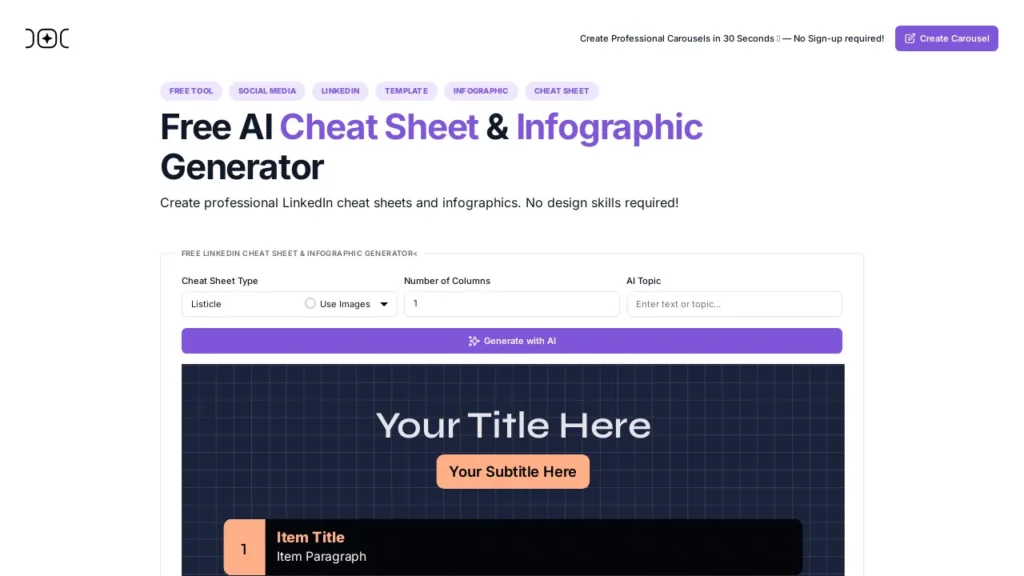
Discover the power of the AI LinkedIn Cheat Sheet & Infographic Generator, a free tool designed to help you create visually engaging and informative content tailored for your LinkedIn audience. This innovative application simplifies complex information into compelling visuals, enhancing user understanding while significantly boosting engagement. With a range of customizable templates and design settings, users can maintain their unique branding whether for personal or corporate use.
Key Features of the AI Carousels Cheat Sheets
- Free and User-Friendly: The tool offers a streamlined experience for creating impactful LinkedIn cheat sheets and infographics.
- Visual Simplification: Enhance comprehension and engagement by converting complex ideas into visually appealing representations.
- Customizable Design: Choose from various templates and design options to align with your branding goals.
How to Maximize Your Content Creation with LinkedIn Cheat Sheets
Create Engaging Infographics
Utilizing the infographic creation feature, you can convey information in a format that resonates well with your LinkedIn audience. Infographics have proven to be a powerful tool for marketing and can help your content stand out amidst the sea of text-based posts.
Boost Your Marketing Strategy
By integrating AI-generated visuals into your posts, you can significantly enhance your overall marketing strategy. Infographics and cheat sheets that simplify and summarize important concepts not only attract views but also shareability, driving organic traffic to your LinkedIn profile.
Utilize AI Tools for Effective Design and Visualization
Embrace the capabilities of this AI tool to transform your ideas into visually striking content. The built-in features allow for seamless design & visualization, ensuring your cheat sheets are not just informative but also aesthetically pleasing.
Use Cases
-
Social Media Marketers: Engaging Campaigns
- Marketers can use the AI LinkedIn Cheat Sheet & Infographic Generator to create visually appealing cheat sheets that summarize campaign performances or key marketing statistics. By turning complex data into simplistic visuals, they can boost engagement and share insights with their audience effectively.
-
Corporate Trainers: Simplifying Learning
- In corporate training sessions, trainers can leverage the tool to develop informative infographics that simplify complex processes or concepts. This can enhance learning experiences by making sure employees grasp essential information quickly, fostering a more engaging training environment.
-
Small Business Owners: Branding and Promotion
- Small business owners can utilize customizable templates to create cheat sheets showcasing their products or services. By using the generator for creating brand-specific infographics, they can better communicate their offerings to potential clients on LinkedIn, ultimately enhancing brand visibility.
-
Content Creators: Crafting Shareable Content
- Content creators and bloggers can make use of this tool to transform detailed articles into digestible infographics that can be easily shared on LinkedIn. This not only pulls in traffic but also positions them as thought leaders in their niche, leading to greater community engagement.
- Educators: Enhancing Class Materials
- Educators can create visual aids for lessons utilizing the AI tool. By converting educational content into cheat sheets or infographics, they can facilitate understanding among students, making learning more interactive and memorable.
General Evaluation of AI Carousels Cheat Sheets
Overall Sentiment
The AI Carousels Cheat Sheets have received a predominantly positive reception from users. Feedback suggests that the tool is appreciated for its user-friendly interface and efficiency in generating content. Many users highlight the value it brings to simplifying complex topics and streamlining workflow, indicating a strong demand for its capabilities.
Strengths and Weaknesses
Key strengths of the AI Carousels Cheat Sheets include its ease of use, diverse application, and ability to save time in content creation. Users find it particularly beneficial for organizing information in a visually appealing format, which enhances engagement. However, there are some reported limitations, such as occasional inaccuracies in output and a need for greater customization options to better suit individual use cases. These areas for improvement suggest potential growth opportunities for the tool as it evolves.
AI Carousels Cheat Sheets – Reviews and User Feedback
This AI tool hasn’t been reviewed yet. Be the first to leave your feedback.
Used AI Carousels Cheat Sheets recently? Tell us what you liked (or didn’t) — your feedback makes a difference.
You may also be interested in
Post Once Hub
Dashworks Bots
Video Studio AI
AutoReels
Easy Sticker Maker
AI Illustration Generator
Writastic AI
ClipAnything AI
AI Flashcards Generator
Generate Icons
Opps
Cotinga AI